 TimeCraft
TimeCraft: Your Ultimate All-in-One Timer Dashboard for Unmatched Productivity
1. Introduction: Unlocking Your Productivity with the Right Tools
In today's fast-paced digital world, effective time management is no longer a luxury—it's a necessity. From juggling work deadlines to personal goals, managing our precious minutes efficiently can be the difference between feeling overwhelmed and achieving peak productivity. While countless individual online tools promise to help, they often leave us scattered across multiple browser tabs, searching for a countdown timer here, an alarm online there, and a stopwatch somewhere else.
What if there was a single, intuitive platform that brought all these essential time management utilities together? Enter TimeCraft, the revolutionary all-in-one timer dashboard designed to streamline your workflow, enhance focus, and bring unprecedented clarity to your daily schedule. This comprehensive overview will delve into what makes TimeCraft the go-to solution for anyone serious about mastering their time.
2. What is TimeCraft? A Holistic Approach to Time Management
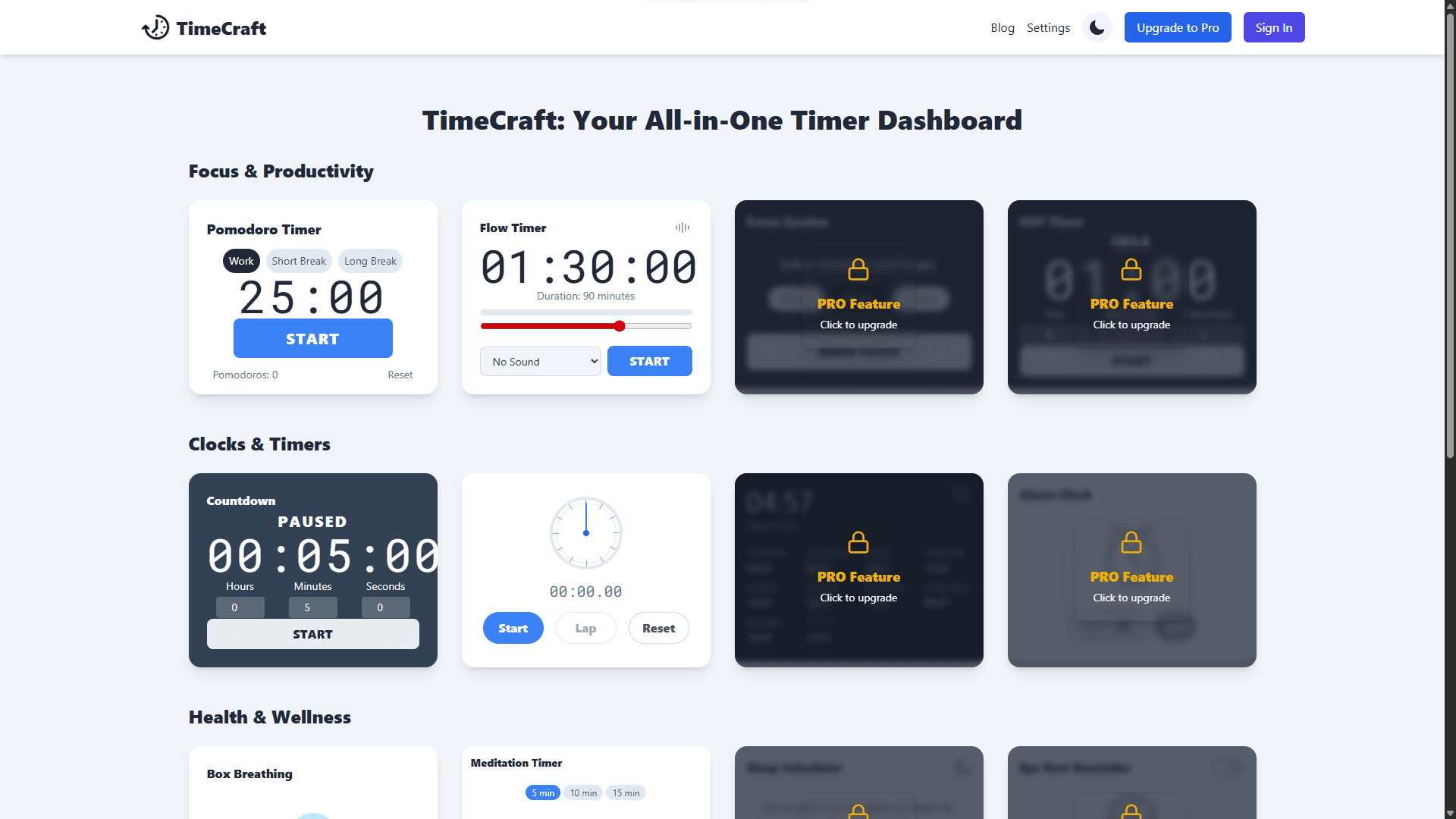
TimeCraft is more than just a collection of timers; it's a meticulously designed online productivity tool suite presented as a unified, interactive dashboard. Born from the need for simplicity and efficiency, TimeCraft eliminates the hassle of switching between various websites or applications for different time-related tasks. It offers a centralized hub for all your time management needs, blending powerful functionality with a minimalist, distraction-free interface.
Whether you're a student striving for better study habits, a professional aiming for peak work performance, or simply someone who wants to better organize their day, TimeCraft provides an intuitive experience with its array of meticulously crafted widgets. The platform is built on the philosophy that sophisticated tools should be easy to use and visually pleasing.
From the moment you arrive, TimeCraft presents a clean, organized space where you can instantly access an online timer for specific tasks, set a reliable alarm online for important events, or utilize a precise stopwatch for tracking durations. It's truly an all-in-one timer dashboard designed to be your ultimate companion in mastering time.
3. A Brief History: From Scattered Tools to an Integrated Solution
The evolution of digital timekeeping tools has seen a proliferation of single-purpose apps. For decades, users relied on standalone countdown timers, dedicated alarm clock websites, or basic stopwatches. While these tools were effective in isolation, the demands of the modern digital age soon outpaced their fragmented nature. The growing popularity of structured time management methodologies, such as the Pomodoro Technique, further highlighted the need for more cohesive solutions, often requiring users to piece together multiple disparate applications or resort to manual tracking.
The concept for TimeCraft emerged directly from this fragmentation. Developers and productivity enthusiasts identified a critical gap in the market: the lack of an integrated platform that could consolidate diverse time management functions. The realization was clear – true efficiency and seamless workflow management stem from integration, not segregation. Instead of a disjointed set of tools, the vision was to create an all-in-one timer dashboard that intuitively anticipates user needs, providing immediate and unified access to every conceivable time-related utility. TimeCraft, therefore, represents a significant leap in the evolution of time management, transcending basic digital clocks to offer a comprehensive, intuitive, and seamlessly integrated platform that stands alone in its category.
4. How TimeCraft Works: Your Dashboard at a Glance
TimeCraft operates on a straightforward, widget-based interface, making it incredibly easy to navigate and utilize. Upon visiting the dashboard, you're greeted with a customizable grid of individual time widgets, each serving a specific purpose, ready to be activated with a click.
- Widget-Based Design: Every tool, be it the Pomodoro Timer, Stopwatch online, or Online Alarm, exists as a self-contained "widget" on your central dashboard. This modular approach allows you to interact with each one independently without affecting others, providing unparalleled flexibility.
- Real-time Updates: Thanks to its client-side nature and efficient use of modern web technologies, all timers and clocks update in real-time. This ensures absolute accuracy, critical for precise time management.
- Intuitive Controls: Each widget is designed for minimal friction, featuring clear and responsive start, pause, reset, and setting buttons. This intuitive design allows you to focus on your task, not on learning complex software.
- Customization: Many widgets offer extensive customization options, including a wide selection of sounds, variable durations for tasks and breaks, and other preferences. This allows you to tailor TimeCraft precisely to your unique needs and preferences, creating a truly personalized productivity environment.
- Accessibility: Built with user experience at its forefront, TimeCraft is fully accessible across various devices and browsers. Whether you're on a desktop, laptop, tablet, or smartphone, your all-in-one timer dashboard functions seamlessly, ensuring your productivity tools are always within reach.
The fundamental beauty of TimeCraft lies in its simplicity. There are no complex installations, no heavy software downloads, and no cumbersome accounts to manage beyond basic authentication. Simply open your web browser, visit our site, and your personalized all-in-one timer dashboard is immediately ready to help you manage your time effectively and efficiently.
5. Practical Applications: Empowering Your Daily Routine
The diverse set of tools within TimeCraft makes it an indispensable asset for a wide range of scenarios, seamlessly integrating into various aspects of your life.
- For Students:
- Utilize the Pomodoro Timer for structured, focused study sessions, maximizing information retention and preventing mental fatigue.
- Set precise Countdown Timers for exam preparation, ensuring you allocate appropriate time to each subject or question.
- Use the Stopwatch to time practice problems or to assess how long it takes to complete specific study tasks, aiding in better time estimation.
- The Eye Rest Reminder (Pro feature) can be crucial during long study hours, prompting you to take necessary breaks and prevent digital eye strain.
- For Professionals:
- Implement the Pomodoro method for deep work periods, shielding yourself from interruptions and boosting concentration on critical tasks.
- Track project phases and individual task durations with the Time Tracker, gaining valuable insights into your actual work distribution.
- Use the Agenda Widget to keep a visual eye on upcoming tasks and meetings, ensuring you stay aligned with your daily schedule.
- The Distraction Tracker (Pro feature) offers powerful insights into what pulls your focus, helping you identify and minimize productivity leaks and build healthier work habits.
- For Fitness Enthusiasts:
- Employ the Interval Timer (Pro feature) for high-intensity interval training (HIIT) workouts, guiding your work-rest cycles precisely.
- The Stopwatch is perfect for timing laps, specific exercise sets, or monitoring recovery periods during your training sessions.
- The Breathing Timer can be used for pre- or post-workout mindfulness and cool-down routines, enhancing recovery and mental clarity.
- For Health & Wellness:
- Employ the Meditation Timer for guided or unguided meditation sessions, with customizable durations and gentle end signals.
- The Breathing Timer provides structured exercises for stress relief and relaxation, guiding you through mindful breathing patterns.
- The Sleep Cycle Calculator (Pro feature) offers a scientific approach to optimizing your sleep schedule, helping you wake up feeling more refreshed and energized by aligning with natural sleep cycles.
- For Home & Everyday Use:
- A quick Countdown Timer is indispensable for cooking, baking, or any household chore requiring precise timing.
- A reliable Alarm Clock is perfect for daily wake-ups, reminding you to take medications, or alerting you to TV shows/events.
- The World Clock (Pro feature) is invaluable for coordinating with international contacts, planning global events, or simply keeping track of time zones while traveling virtually.
TimeCraft integrates seamlessly into virtually any lifestyle, providing the precise tools you need, precisely when you need them. Its adaptability makes it an invaluable asset for anyone looking to achieve greater organization, focus, and overall well-being.
6. The Undeniable Advantages of TimeCraft
Opting for TimeCraft as your all-in-one timer dashboard offers a multitude of benefits that significantly outweigh the limitations of fragmented, single-purpose solutions.
- Streamlined Workflow: The most immediate advantage is the elimination of context switching. Instead of toggling between multiple browser tabs or apps, all your essential time tools are conveniently arranged on a single, intuitive screen. This reduces mental overhead, minimizes distractions, and allows for a more fluid and uninterrupted workflow.
- Enhanced Productivity & Focus: By providing immediate access to structured timing tools like the Pomodoro Timer, Flow Timer, and Focus Timer, TimeCraft actively helps you structure your work intervals. This disciplined approach is proven to boost concentration, reduce procrastination, and ultimately enables you to accomplish more in less time.
- Consistency & Reliability: Utilizing a single, unified platform ensures consistent performance and a cohesive user experience across all its integrated tools. You don't have to adapt to different interfaces or worry about varying levels of accuracy between separate applications.
- Universal Accessibility: As a completely browser-based solution, TimeCraft is universally accessible from any device with an internet connection. There's no need for cumbersome software installations, lengthy downloads, or complex data syncing across devices. Your personalized dashboard is always just a click away, whether you're at your desktop, on a laptop, or using a mobile device.
- Cost-Effectiveness: While a Pro version offers advanced and specialized features for power users, the core TimeCraft dashboard provides a robust set of free functionalities. This ensures that powerful and effective time management tools are accessible and affordable for everyone, regardless of their budget.
- Data-Driven Insights (Pro Feature): For users who upgrade to the Pro version, features like the Distraction Tracker offer invaluable, actionable insights into your work habits. By logging and analyzing your distractions, you can identify patterns, understand your unique productivity challenges, and continuously refine your strategies for optimal focus and efficiency.
- Holistic Health & Well-being Focus: Unlike many productivity tools that solely focus on task completion, TimeCraft integrates specialized widgets for mental and physical well-being. Tools for breathing exercises, meditation, and sleep optimization underscore its commitment to a holistic approach, recognizing that true productivity is intertwined with a balanced and healthy lifestyle.
7. Addressing Potential Drawbacks
While TimeCraft is engineered for peak performance and user satisfaction, it's important to provide a balanced perspective by acknowledging common considerations associated with any online productivity tool.
- Internet Connection Dependency: As a purely online, browser-based application, a stable and reliable internet connection is required for TimeCraft to function at its full potential. While efforts are made to minimize data usage, true offline capabilities are not a primary focus of its design.
- Browser Performance Variations: While optimized for modern web browsers, the performance and responsiveness of TimeCraft may exhibit slight variations across different browser engines or older versions. Users are encouraged to use updated versions of popular browsers (Chrome, Firefox, Edge, Safari) for the best experience.
- Initial Feature Overload for Extreme Minimalists: For individuals who might be seeking only the absolute bare minimum (e.g., a single, basic online timer with no other features), the sheer breadth of available widgets on the dashboard might initially appear overwhelming. However, the modular design allows users to easily ignore or minimize tools they don't currently need, focusing only on their active selection.
- Limited Customization for Highly Niche Use Cases: While TimeCraft offers extensive customization for general productivity and well-being, for highly specialized, industry-specific timing needs (e.g., scientific experiments requiring sub-millisecond precision, complex multi-stage industrial processes, or highly custom development workflows), dedicated, specialized software might still be more appropriate. TimeCraft is primarily optimized for personal users, students, freelancers, and general professional productivity.
These points are minor in comparison to the extensive benefits offered by an all-in-one timer dashboard solution, but it's important for users to understand the context of its capabilities.
8. TimeCraft vs. Alternatives: Why Choose All-in-One?
The market is saturated with various time management tools, ranging from simple online timers to complex project management suites. Below is a comparison demonstrating why TimeCraft, as an all-in-one timer dashboard, stands out as the superior choice for most users seeking a balanced and efficient solution.
| Feature | TimeCraft (All-in-One Dashboard) | Standalone Online Timers | Dedicated Desktop/Mobile Apps |
|---|---|---|---|
| Accessibility | Browser-based, universally accessible, cross-device | Browser-based, limited to specific tool per tab | Requires app installation, device-specific or platform-limited |
| Integration | Seamless across all integrated widgets on one dashboard | None, necessitates constant tab switching and context loss | Varies; may offer some integration with OS features or other apps, but often siloed |
| Feature Set | Comprehensive; includes basic, advanced, and well-being tools (Basic + Pro) | Highly limited, focused on a single function (e.g., just a countdown) | Can be feature-rich, but often leads to "app fatigue" or siloed data |
| Setup/Installation | None; simply visit the website | None; simply visit the website | Required; can consume device storage and resources |
| Cost | Robust Free (Basic) version / Affordable Pro Subscription | Typically free | Varies; many are paid, some with subscription models |
| Distraction Management | Minimized by unified dashboard; integrated distraction tracking (Pro) | High due to constant tab switching and context loss | Moderate; can contribute to notification overload from various apps |
| Data Tracking (Pro) | Centralized insights for holistic productivity analysis | None; no tracking beyond immediate session | Often basic, with data confined to individual apps, making holistic analysis difficult |
| Focus on Well-being | Integrated tools for mindfulness, breathing, and sleep optimization | None, purely functional | Rare; most focus solely on productivity metrics |
The primary differentiator for TimeCraft is its unwavering commitment to being an all-in-one timer dashboard. While individual tools undoubtedly excel at their specific tasks, they inherently introduce friction into a user's workflow. TimeCraft masterfully removes this friction, offering a harmonious and powerful ecosystem of productivity and well-being tools. This integrated approach not only saves time but also promotes a more consistent and mindful approach to daily tasks.
9. Top TimeCraft Tools to Kickstart Your Productivity
While every widget in TimeCraft is meticulously designed for a specific purpose, here are 5 key tools that can immediately help you begin your journey to enhanced time management and productivity:
- Pomodoro Timer: The cornerstone of focused work. Use it to implement structured work intervals and scheduled breaks, a method proven to enhance concentration and prevent mental fatigue.
- How to Use: Set your work time (e.g., 25 min), dive into your task, then take a short break (e.g., 5 min). Repeat this cycle. After every four Pomodoros, take a longer break (e.g., 15-30 min).
- Why it's vital: Helps overcome procrastination, maintains high focus, and ensures regular mental recharge.
- Flow Timer: Ideal for longer, uninterrupted deep work sessions where you need to maintain a state of "flow" without external interruptions.
- How to Use: Assign a specific, larger chunk of time (e.g., 60 or 90 minutes) to a complex task that requires sustained concentration. Minimize all distractions during this period.
- Why it's vital: Perfect for creative tasks, coding, writing, or problem-solving that require extended, deep engagement.
- Countdown Timer: A versatile tool perfect for task deadlines, cooking, presentations, or any activity with a fixed time limit.
- How to Use: Simply input your desired hours, minutes, and seconds, then hit start. You can customize the sound that plays when the time expires.
- Why it's vital: Creates a sense of urgency, helps in time-boxing tasks, and ensures you don't miss important time limits.
- Stopwatch: For precise measurement of activities or tracking exercise laps, providing accurate elapsed time.
- How to Use: Simply click "Start" to begin measuring elapsed time, "Stop" to pause, and "Reset" to clear. Use the "Lap" feature to record multiple intervals within a single session.
- Why it's vital: Essential for performance tracking, time auditing your activities, or simply measuring the duration of any event with accuracy.
- Alarm Clock: A reliable and versatile tool for daily wake-ups, crucial meeting alerts, medication reminders, or simply signaling the end of a work block.
- How to Use: Set a specific time (e.g., 7:00 AM or 3:30 PM), choose your preferred alarm sound from our selection, and enable repetition for recurring events (e.g., daily, weekdays).
- Why it's vital: Ensures you stay punctual, never miss important events, and can rely on a consistent reminder system.
10. Common Mistakes to Avoid in Time Management
Even with the most sophisticated tools like TimeCraft at your disposal, certain common pitfalls can derail your productivity and lead to feelings of being overwhelmed. Being mindful of these errors can significantly enhance your time management efforts:
- Over-scheduling & Lack of Buffer Time: A common mistake is packing every minute of your day with tasks. This leaves no room for unexpected interruptions, urgent tasks, or simply a moment to breathe.
- Solution: Use your Time Tracker to log actual task durations and allocate an extra 15-30% buffer time between scheduled activities.
- Ignoring Regular Breaks: Consistent, uninterrupted work without proper breaks inevitably leads to mental fatigue, decreased focus, and eventual burnout.
- Solution: Actively use the Pomodoro Timer or set specific Countdown Timers to enforce regular, short breaks (e.g., every 25-50 minutes) to recharge.
- Multitasking: The myth of efficient multitasking persists, but research consistently shows that trying to do too many things at once drastically reduces overall efficiency and increases error rates.
- Solution: Focus on one task at a time. Use your Pomodoro Timer or Flow Timer to dedicate specific blocks of time to single tasks, minimizing context switching.
- Underestimating Task Time: Many individuals are overly optimistic about how long tasks will take, leading to missed deadlines and rushed work.
- Solution: Use the Time Tracker diligently to log actual task durations. Over time, this data will allow you to make more realistic and accurate time estimations for future projects.
- Not Prioritizing Effectively: Treating all tasks as equally important means you're not focusing your energy where it matters most.
- Solution: Before starting your day, use the Agenda Widget or a simple task list to identify and tackle high-priority or "most important" items first.
- Distraction Addiction: Constantly checking social media, emails, or unrelated websites can severely erode your productivity.
- Solution: Use the Distraction Tracker (Pro feature) to identify your biggest time sinks. Implement strategies like setting specific "check-in" times for email or using website blockers during focused work blocks.
11. Conclusion: Your Journey to Time Mastery Begins Now
TimeCraft is more than just an all-in-one timer dashboard; it's your indispensable partner in the relentless quest for optimal productivity and enhanced well-being. By seamlessly integrating a diverse array of essential time management tools into one intuitive and powerful online platform, we empower you to take absolute control of your day, effectively minimize distractions, and achieve your goals with unparalleled ease and efficiency.
Say goodbye to the frustrations of fragmented tools, the chaos of scattered browser tabs, and the drain of constant context switching. Embrace a unified, streamlined, and profoundly effective approach to managing your most valuable asset: your time. Whether you're a seasoned productivity guru constantly seeking an edge, or just embarking on your journey to better time management, TimeCraft provides the clarity, control, and comprehensive toolkit you need to transform your daily routine and unlock your full potential.
Ready to manage your time effectively?
Start using TimeCraft now and unlock a world of organized productivity.
Go to Timers12. Frequently Asked Questions (FAQ)
Q: Is TimeCraft completely free to use?
A: TimeCraft offers a robust set of free features, including the core Pomodoro Timer, Stopwatch, and Countdown. We also offer a Pro version with advanced widgets like the World Clock and Distraction Tracker for users seeking even greater control and insights, designed to take your productivity to the next level.
Q: Do I need to download any software to use TimeCraft?
A: Absolutely not! TimeCraft is a purely browser-based online timer dashboard. There are no downloads, no installations, and no complicated setup processes. Simply open your preferred web browser, visit our site, and you're immediately ready to start managing your time effectively.
Q: Can I use TimeCraft on my mobile device?
A: Yes, definitely! TimeCraft is meticulously designed with a responsive and adaptive interface. This ensures a seamless and fully functional experience across a wide range of devices, including desktops, laptops, tablets, and smartphones, so your productivity tools are always with you.
Q: How does the "Pro Feature" upgrade work?
A: The "Pro Feature" upgrade unlocks a suite of advanced widgets and specialized functionalities not available in the free version. These are designed for users who want to push their time management and tracking capabilities further. For demonstration purposes in this application, upgrading to Pro is a simulated action. In a real-world production scenario, it would typically involve a secure subscription process or a one-time purchase.
Q: Is my data private and secure with TimeCraft?
A: We take user privacy and data security very seriously. While TimeCraft primarily operates locally in your browser, for features requiring user accounts or persistent settings, we utilize secure, industry-standard authentication methods (like Firebase Authentication). We adhere to strict privacy policies. Please refer to our Privacy Policy for detailed information on how we handle your data.